
Version Comparison
See exactly what changed
between two IFC versions
Load an old and a new IFC and instantly get a full comparison — added, deleted, and modified elements highlighted in 3D with property-level change details. Export the results to BCF or PDF for team review.
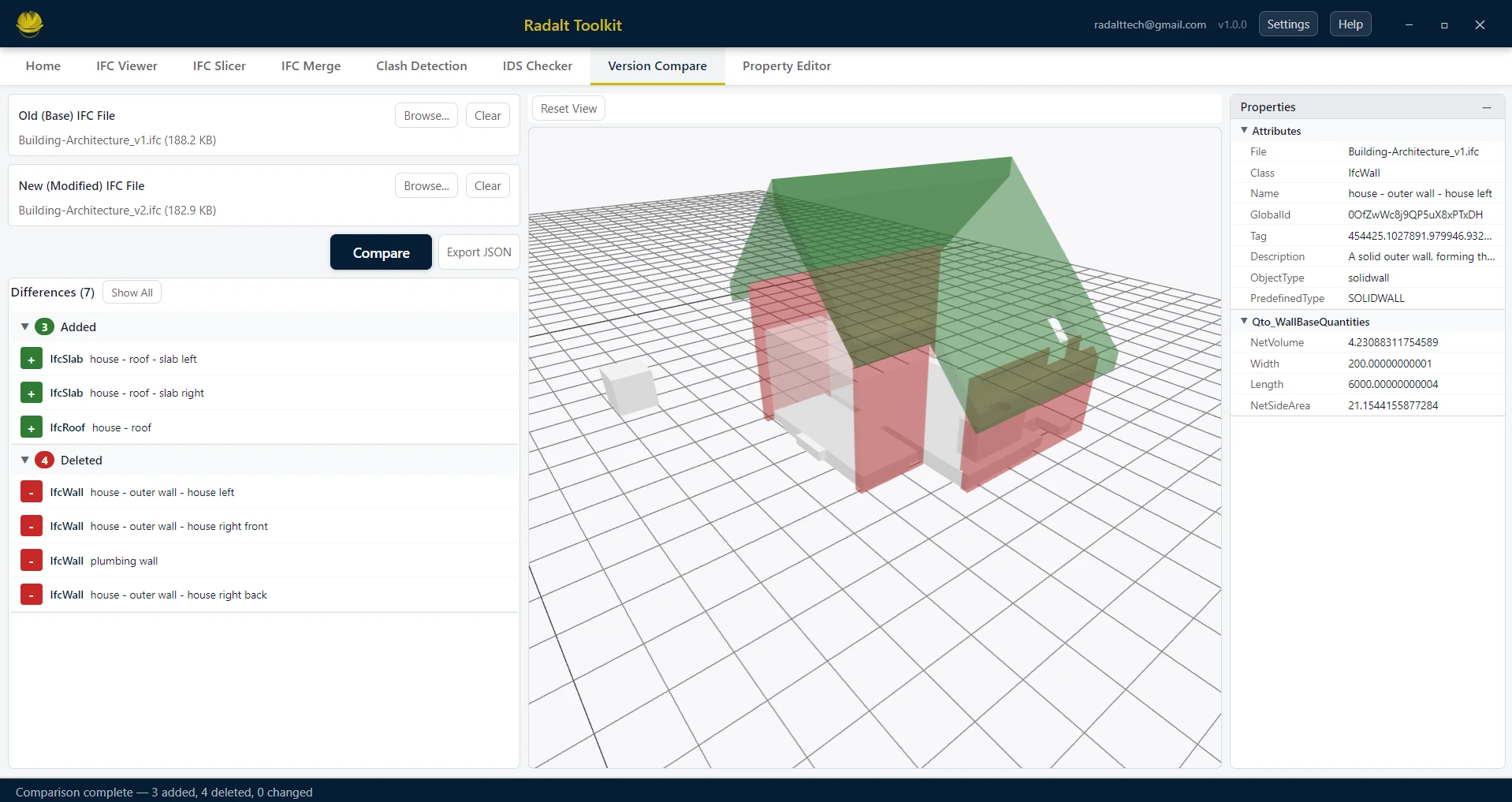
Scenarios recreated using sample files from buildingSMART International website.
Capabilities
What Version Comparison can do
Load Two IFC Versions
Open an "old" and a "new" version of the same IFC — for example, from two different project phases or after a design revision.
Instant Comparison
The comparison runs automatically the moment both files are loaded. No manual configuration — Radalt Toolkit handles all element matching and comparison logic internally.
Added / Deleted / Changed
Results are organized into three clear categories: elements that were added in the new version, elements that were deleted, and elements whose properties changed.
Color-coded 3D Visualization
Added elements appear in green, deleted in red, and modified in blue — directly in the 3D viewer. Toggle each category on or off to focus your review.
Property Change Details
Click any changed element to see a side-by-side breakdown of old vs. new property values — pinpointing exactly what was modified.
Export to BCF or PDF
Share the comparison results with your team by exporting to BCF (with viewpoints) or as a formatted PDF report with change lists and 3D screenshots.