
Talk To Building
Let Building Talk First
- the good, the bad, and the ugly
Talk To Building (TTB) is an additional AI dimension integrated with the Radalt Toolkit. The moment a file loads, every entity, relationship, and property is parsed locally. TTB delivers a structured summary, runs a role-tailored hygiene report, and stays available for natural-language follow-up — with the 3D viewer navigating to whatever it's talking about.
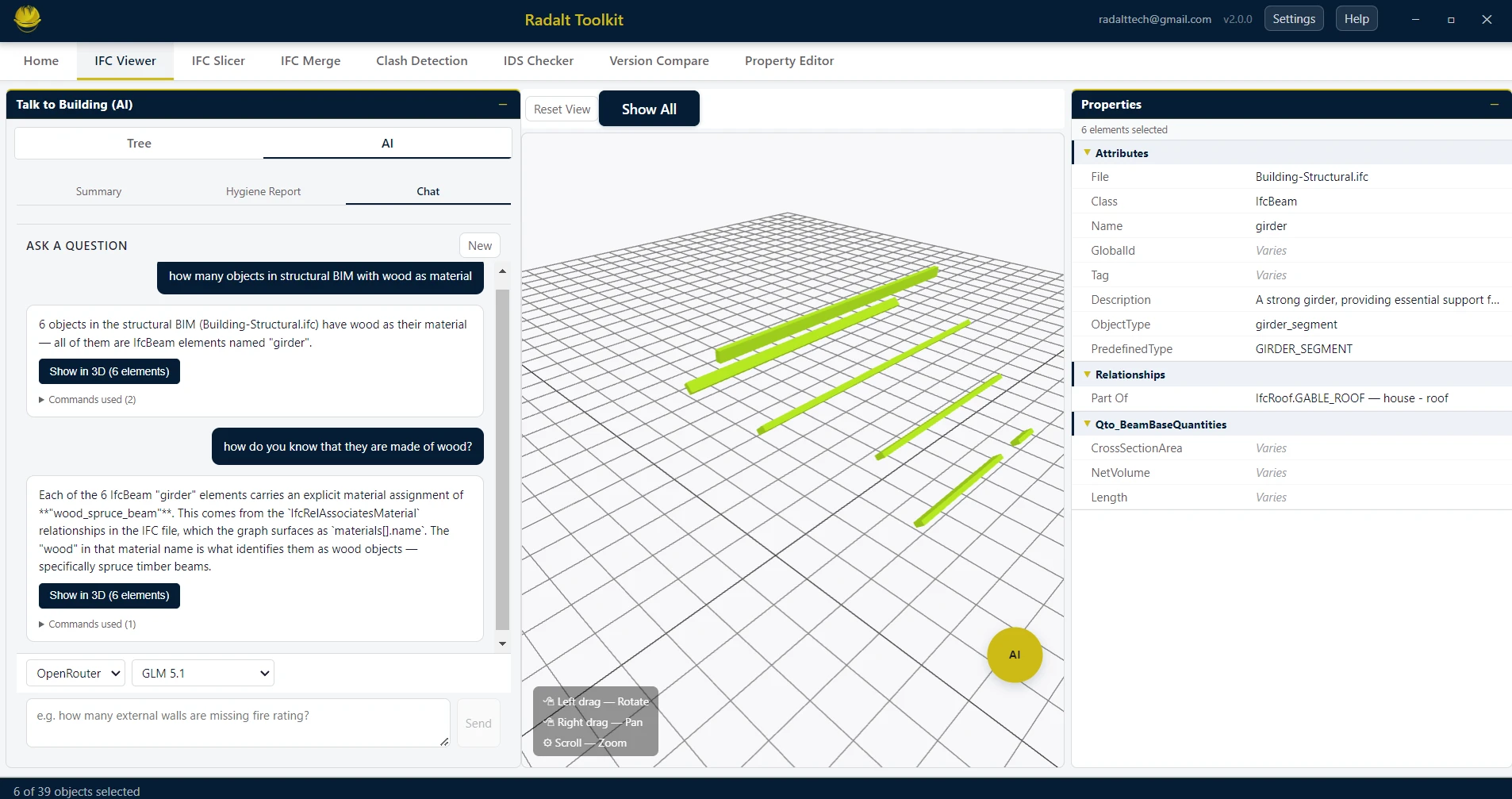
Scenarios recreated using sample files from buildingSMART International website.
Capabilities
What Talk To Building can do
Speaks First, No Query
The moment an IFC opens, TTB delivers a structured summary. No question to type, no menu to navigate, no role to set up first. Just open the file and read the report.
Role-tailored Hygiene
Pick your role once — Architect, Structural, MEP, BIM Coordinator, Contractor, or Facility Manager. Every IFC then opens with a quality report scoped to what that role actually checks for.
3D Reply Built In
Click any finding and the relevant elements isolate in the 3D viewer. Ask the chat a follow-up and the camera flies to the answer. The 3D viewer is the AI's output canvas, not just a passive viewer.
Exportable Findings
Every hygiene finding is one click away from a BCF (2.1 or 3.0), PDF, or Excel file — with 3D screenshots embedded per check. Drop it into your authoring tool, your director's inbox, or a spreadsheet.
Your File Stays Local
Radalt parses your IFC entirely on your machine. The AI chat sends only the structured graph it needs to answer — never the file itself. No cloud upload, no telemetry.
BYOK — Your AI Key
Bring your own Claude (Anthropic) or DeepSeek API key, or route through OpenRouter to use Claude, GPT, GLM, or other models. Switch providers and models from the settings panel.
The Five Stages
From file-open to fix, in one flow
TTB is built as five progressive stages of intelligence. Each stage builds on the last, and you can stop at any point — or flow through all five in a single session.
Auto Summary
"What am I looking at?"
Triggered the moment a model opens. Identity (building name, type, primary structural material, authoring software, IFC version), scale (storeys, total elements, gross floor area), and a five-tier detection of every distribution system present (HVAC, plumbing, electrical, comms). Pure description — no judgement, no issues flagged.
Role-based Hygiene Report
"What's wrong with it?"
Runs automatically once you pick your role. Surfaces data quality issues, missing information, and model gaps specific to what that role cares about. Role selection is persisted — you only pick once.
One-click Export
"Package this up."
Export every finding to BCF (2.1 or 3.0), PDF (landscape A4 with framed screenshots per check), or Excel (two sheets with inline screenshots — Hygiene Issues and Clash Pairs). Per-card screenshots are captured by isolating each card's elements, framing them, and snapshotting the canvas — automatically.
AI Chat with 3D Reply
"I have more questions."
Floating draggable chat panel backed by an IFC graph built in the background on file open. Ask in natural language — "Show me only the Level 3 clashes", "Which of those walls are load-bearing?" — and the answer appears as text while the 3D viewer highlights and flies to the elements. BYOK Claude (Anthropic), DeepSeek, or OpenRouter; pick your model.
AI-assisted issue resolution
"Fix it now."
Jump from any hygiene finding or chat result directly into the Property Editor with the flagged elements pre-selected — bulk-assign missing properties without losing your place. Coming in a future release.
Role-tailored Hygiene
Six roles. Six different reports.
Pick your role once. Every IFC opens with a quality report scoped to what that role actually cares about — not a generic data dump.
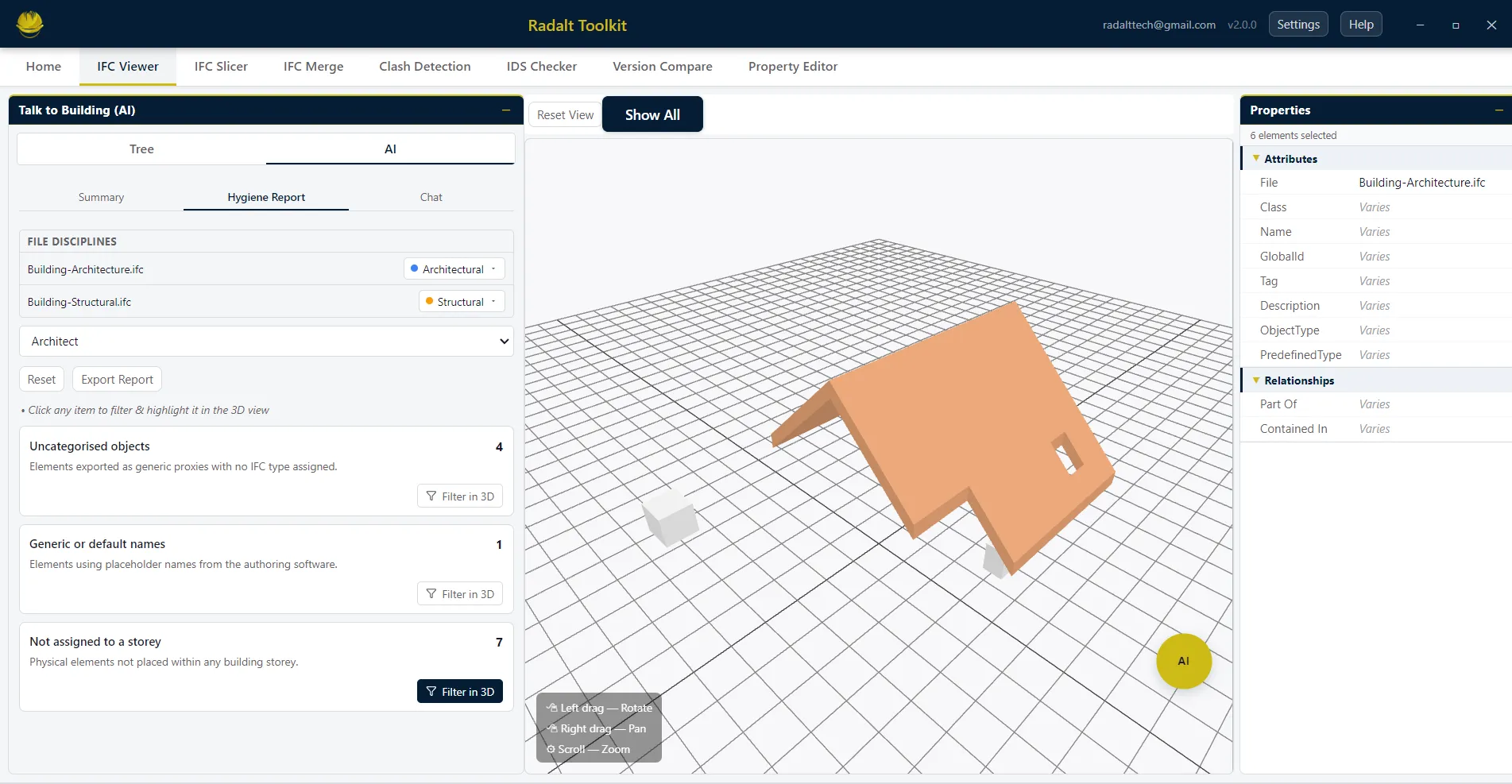
Architect
- Objects with no category
- Elements missing material assignment
- Elements with generic or default names
- Elements not assigned to any storey
Structural Engineer
- Objects with no category
- Elements missing material assignment (concrete grade, steel section, timber spec)
- Missing basic structural object types (Foundations, Columns, Beams, Slabs, Walls)
MEP Engineer
- Objects with no category
- Objects missing system type assignment
- MEP systems with disconnected runs
- Missing basic MEP types (Ducts, Pipes, Cable trays, Equipment)
BIM Coordinator
- Combined hygiene report across every loaded discipline
- Inter-discipline hard clashes (Struct vs MEP, Arch vs MEP, Arch vs Struct)
- Intra-discipline hard clashes within each model
- One report. No prep. Walk into the meeting ready.
Contractor
- Constructability report — every hard clash that cannot be built as modelled
- Highlighted in 3D
Facility Manager
- MEP assets missing warranty, maintenance interval, manufacturer, or serial number
- MEP objects with generic names
- FM-handover readiness on day one of occupation
Export Anywhere
Findings, packaged for the next step
Every hygiene finding and clash pair is one click away from a shareable file. Screenshots are captured automatically by isolating each card's elements in 3D and framing them — no manual snapshotting.
BCF
One topic per flagged element and per clash pair. The corresponding 3D snapshot is attached as the visualization-info image. Open it in any BIM authoring tool.
Landscape A4 report. Each hygiene check starts on a new page with title, framed 3D screenshot, and element table. Followed by a Clash Pairs table mirroring the clash detection report layout.
Excel (.xlsx)
Two sheets with screenshots embedded inline. "Hygiene Issues" — one row per check with title, element list, and screenshot. "Clash Pairs" — one row per pair following the clash detection PDF layout.
AI Chat
Ask anything. The building answers in 3D.
After the auto-reports run, the conversation continues. A floating, draggable chat panel — backed by an IFC graph built in the background on file open — lets you drill into specific findings, ask follow-up questions, and navigate the model conversationally.
- Bring your own key. Claude (Anthropic) or DeepSeek API directly, or OpenRouter for access to Claude, GPT, GLM, and others.
- Pick your model. Switch providers and models from the settings panel without restarting.
- Your file stays local. Radalt parses the IFC on your machine; only the structured graph the AI needs is sent — never the file itself.
- 3D reply built in. Every answer can highlight elements and fly the camera to frame them.
Examples
- "Show me only the Level 3 clashes"
- "Which of those walls are load-bearing?"
- "Which assets have no maintenance record?"
- "Where is the isolating valve for the east wing?"