
IDS Checker
Validate IFC against
your data specification
Load an IDS file and one or more IFCs to instantly validate compliance. See exactly which elements fail which requirements, visualize failures in 3D, and export a compliance report for your team.
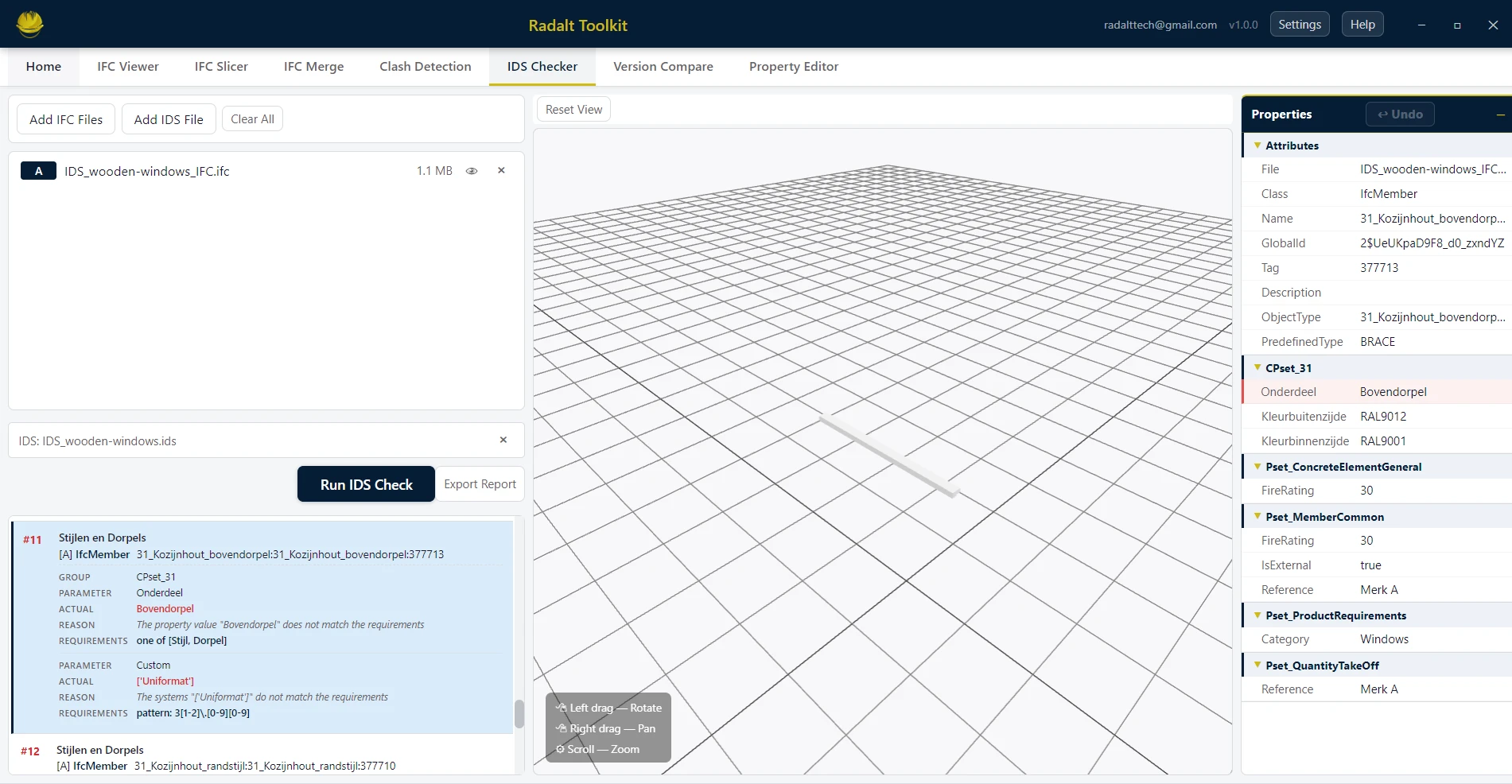
Scenarios recreated using sample files from buildingSMART International website.
Capabilities
What IDS Checker can do
Load an IDS File
Import an .ids XML file defining your Information Delivery Specification — the set of data requirements that IFCs must satisfy.
Validate Multiple IFC Files
Run the same IDS against one or several IFCs in a single session. Results are shown per file so you can compare compliance across the project.
Structured Failure Results
Failures are organized by specification, applicability, and requirement — giving you a clear, actionable breakdown of exactly which elements failed and why.
3D Failure Highlights
Failed elements are automatically color-highlighted in the 3D viewer. Click any failure to jump to that element and inspect its properties.
BCF Export
Export all validation failures as BCF 2.0 or 3.0 issues — complete with element references and viewpoints — for review in Revit, Navisworks, or any BCF tool.
PDF Compliance Report
Generate a formatted PDF showing pass/fail status per specification, failure counts, element lists, and optional 3D screenshots.